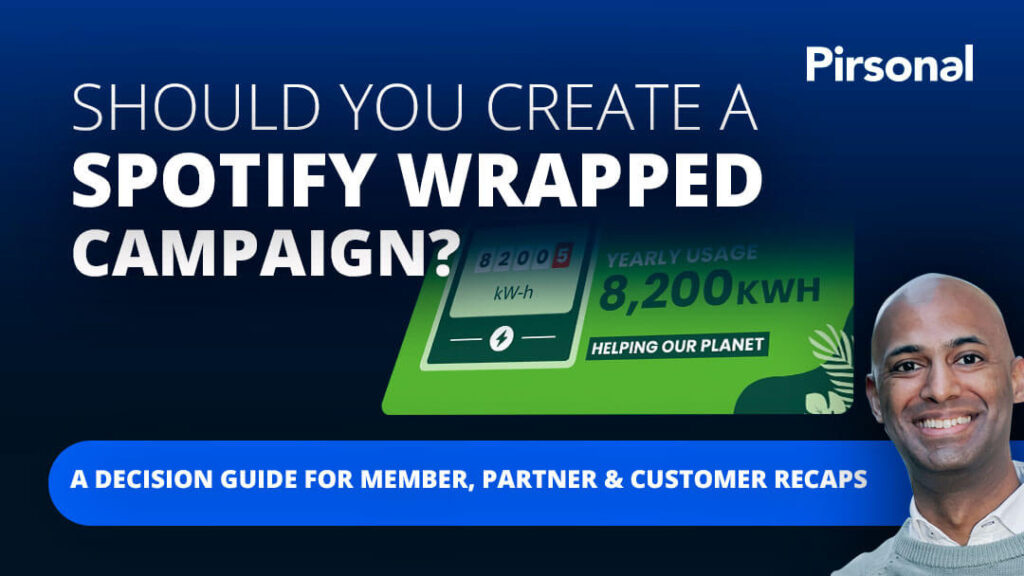
Every year, Spotify Wrapped reminds people of something important:
Data becomes more powerful when it feels personal.
People do not share Spotify Wrapped because it is a dashboard. They share it because it turns their own behavior into a story. It feels specific. It feels recognizable. It says something about them.
That is why more marketing, membership, customer engagement, nonprofit, education, sustainability, and loyalty teams are asking a similar question:
Can we create something like Spotify Wrapped for our customers, members, donors, partners, students, or employees?
The answer is yes.
But the goal is not to copy Spotify.
The goal is to take meaningful individual data and turn it into a personal recap people can understand, feel proud of, and easily share.
That is what Sustainable Salons did with Pirsonal.
Instead of relying only on a static impact report or generic social tile, Sustainable Salons created a Spotify Wrapped-style personalized year-in-review video campaign for its members. Each member could see their own environmental contribution, watch it on a personalized landing page, and download the video to share with their network.
This article explains how to plan a campaign like that and what most teams need to think through before creating one. To explore this story further, watch the following interview to Sustainable Salons’ Marketing Manager, Lucy O’Keeffe:
Key takeaways
- A Spotify Wrapped-style campaign is a personalized recap experience that turns individual data into a story.
- For businesses, this can mean customer usage, member impact, donor contribution, student progress, employee milestones, partner performance, or yearly results.
- The campaign works best when it helps each person answer: “What did I do, achieve, contribute, or make possible?”
- A strong campaign needs more than a nice video. It needs the right data, a clear story, a branded creative direction, a personal viewing experience, and an easy next step.
- Sustainable Salons used four audience segments, with an average of seven personalization fields per template, to create personalized member impact videos with Pirsonal.
Short answer: how do you create a Spotify Wrapped-style campaign?
To create a Spotify Wrapped-style campaign, start with meaningful individual data, choose the story each person should see, design a branded recap experience, personalize the video with the right fields, place it on a personal landing page or viewing experience, add a clear next step such as download, share, renew, register, or book a meeting, and measure what people do after watching.
The goal is not to copy Spotify’s look and feel. The goal is to help each customer, member, donor, partner, student, or employee see their own role in the story.
Who this guide is for
This guide is for marketing, customer engagement, membership, lifecycle, loyalty, nonprofit, education, partner marketing, sustainability, and employee communication teams that already have meaningful audience data but need a better way to turn it into action.
It is especially useful if your team is planning:
- a customer year-in-review campaign
- a member impact report
- a donor impact campaign
- a loyalty recap
- a partner performance review
- a student progress update
- an employee milestone or benefits recap
- a sustainability or ESG impact campaign
- a B2B2C campaign where the end audience needs to understand their personal contribution
- a campaign where customers or members need to see the value they received
- a campaign that should create sharing, renewal conversations, participation, or follow-up action
This approach is not only for consumer brands with millions of users. It can also work for B2B, B2C, and B2B2C teams when the message is important enough that a generic communication may not create enough understanding, trust, or action.
What is a Spotify Wrapped-style campaign?
Like the example above, a Spotify Wrapped-style campaign is a personalized recap that shows each person their own activity, progress, contribution, or results.
For Spotify, the data is about music listening behavior.
For other organizations, the data might be about:
- customer activity
- member contribution
- donor impact
- product usage
- loyalty milestones
- student progress
- employee learning
- partner performance
- sustainability results
- annual achievements
- renewal value
- customer outcomes
- next best actions
The format works because it changes the message from generic to personal.
A generic report says:
Here is what happened this year.
A personalized recap says:
Here is what you did this year.
That difference matters.
When people see themselves in the story, they are more likely to pay attention, remember the message, and share it.
Why static reports often fail to make people care
Most reports are built around the organization.
They show total results, aggregate numbers, broad milestones, and overall impact.
That information may be important, but it often fails to answer the question each person is really asking:
What does this have to do with me?
A member may not only want to know what the whole network achieved. They want to know what their own business contributed.
A donor may not only want to know what the organization achieved. They want to understand what their giving helped make possible.
A customer may not only want to know that a product creates value. They want to see the value they received.
A student may not only need a generic update. They need to understand their own next step.
This is where static reports, PDFs, dashboards, and generic emails often fall short.
They may explain the facts.
But they do not always create recognition.
And recognition is often what makes people care.
The Reporting-to-Recognition Gap
One of the biggest missed opportunities in annual reports, impact reports, and customer recaps is what we call the Reporting-to-Recognition Gap.
Most reports answer:
What happened?
A personalized recap answers:
What did you help make happen?
That is a different emotional experience.
The first version may be useful.
The second version is more likely to feel personal.
This is why personalized year-in-review videos can work so well. They turn data into recognition.
They help people see their role in the story.
And when people feel recognized, they are more likely to engage, share, renew, participate, or take the next step.
When is a personalized recap video worth it?
A personalized year-in-review video is not only for massive audiences. It is also not only for brands trying to create a viral moment.
It is worth considering when the message is important enough that a generic communication may not be enough.
Ask this:
Is this message important enough that it should not feel generic?
That is the Important Enough Rule.
A personalized recap campaign may be worth it when your goal is to increase:
- member engagement
- customer retention
- donor trust
- program participation
- social sharing
- renewal conversations
- product adoption
- student action
- employee understanding
- partner momentum
- sales or customer-success follow-up
The size of the audience matters, but it is not the only factor.
A campaign for a moderate audience can still be valuable if the message is high-stakes, emotionally important, commercially relevant, or difficult to explain through a generic email or PDF.
What data do you need for a Spotify Wrapped-style campaign?
You do not need Spotify-level data to create a strong personalized recap.
You need data that is meaningful to the person receiving the message.
Useful data might include:
- name
- account name
- company name
- membership year
- location
- segment
- usage
- activity
- savings
- points
- milestones
- contribution
- progress
- ranking
- impact
- next recommended action
- product adoption
- purchase history
- renewal date
- donation amount
- participation level
- completed actions
- team or location performance
The best data is not always the most complex data.
The best data is the data that helps the viewer say:
“That was me. I was part of that.”
And data that helps contacts understand their own story and context.
For Sustainable Salons, the personalized data varied by segment and template. Examples included account name, year of membership, kilograms of hair, litres of chemicals, metals, plastics, kilograms of plastic, kilograms of paper, number of trolleys, number of trees, and other impact-related fields.
That level of detail helped each member see their own environmental contribution, not just the organization’s overall results.
What you need to make a personalized recap campaign work
A Spotify Wrapped-style campaign is not just a recap video.
It works when each person sees their own data turned into a story they understand, feel proud of, and can easily share.
To make that happen, most teams need seven things.
1. The right data
Start with the data that matters to the viewer. Do not include a data point just because it is available.
Use data that helps the person understand their own progress, contribution, value, impact, or next step.
Before building the campaign, ask:
- Which data points should be avoided because they may confuse or distract?
- Which data points will the viewer recognize?
- Which data points will make them feel proud, informed, or motivated?
- Which data points support the business goal?
- Which data points are reliable enough to use?
2. A clear story
A personalized recap should not feel like a list of numbers.
It should have a simple story.
For example:
- Look what you achieved.
- Look what you helped make possible.
- Look how far you have come.
- Look what your customers, members, or community experienced.
- Here is what to do next.
The story should guide the viewer from recognition to meaning to action.
3. A branded video design
The campaign should feel like your brand.
That can mean using existing creative assets, brand colors, motion graphics, voiceover, music, or a design your team has already created.
In the Sustainable Salons campaign, the team created the base video creative in Canva, which was already part of their normal creative process.
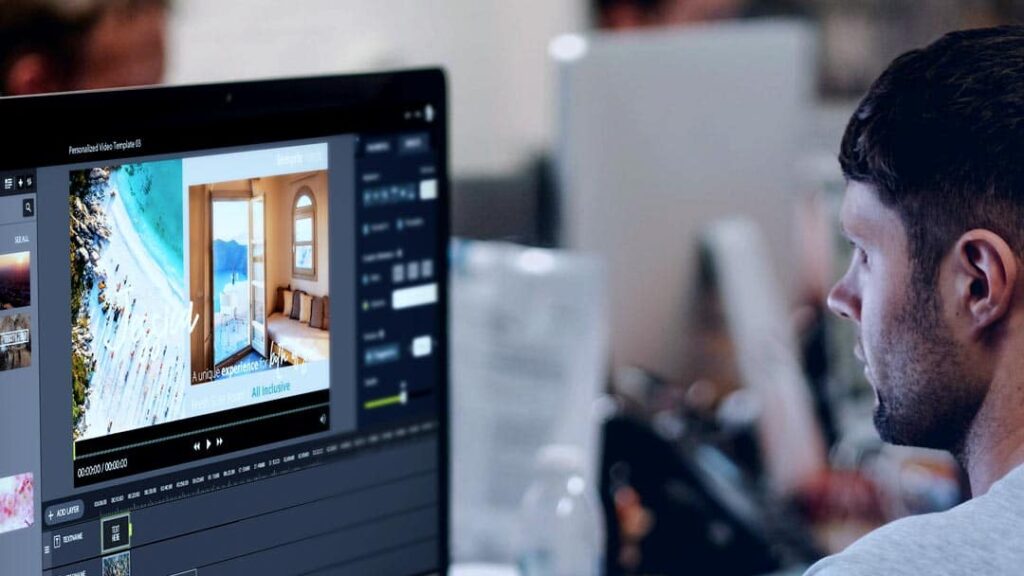
The base videos were then made dynamic with Pirsonal Editor. Pirsonal Editor helps you turn existing video assets into dynamic video templates.
4. Personal details for each viewer
The video should include the personal details that make the experience feel relevant.
That might be a name, account name, segment, milestone, impact number, location, or recommended next step.
Sustainable Salons used four segments, with an average of seven personalization fields per template.
That is a useful reminder: personalization does not need to mean changing every frame of the video. It means changing the right details so the viewer understands, “This was made for me.”
5. A personal landing page or viewing experience
Sending a video file alone is often not enough.
A personalized landing page can give the viewer more context, show the video in a branded environment, include supporting copy, and make the next step clearer.
For Sustainable Salons, the landing page included a personalized headline using the account name.
One version said:
“Hi [Account Name], you’re making sustainability part of every salon visit ♻️”
A previous version used:
“Hi [Account Name], it’s time to celebrate your impact!”
That small personal detail made the experience feel more direct and relevant even before playing the video.
6. A simple way to download or share
If sharing is a goal, make sharing easy.
Do not make people search for the download button. Do not assume they will know what to do next.
Sustainable Salons used a clear download CTA in the personalized experience:
“Share this impact with your network! Download Now”
That mattered because salon owners and teams are busy. Many are likely viewing from mobile. The easier the action, the more likely people are to take it.
If the next step is not sharing, the same principle still applies. Make the next action obvious.
That next action might be:
- download the video
- share the recap
- renew membership
- register for a program
- book a review
- complete a form
- visit the full report
- contact a representative
- donate again
- invite someone else
- update account details
7. A way to measure what people did
A personalized recap campaign should be measured beyond views.
You want to know whether people watched, clicked, downloaded, shared, replied, renewed, registered, or started conversations.
The goal is not only attention.
The goal is action.
How Sustainable Salons created its personalized member recap campaign (case study)
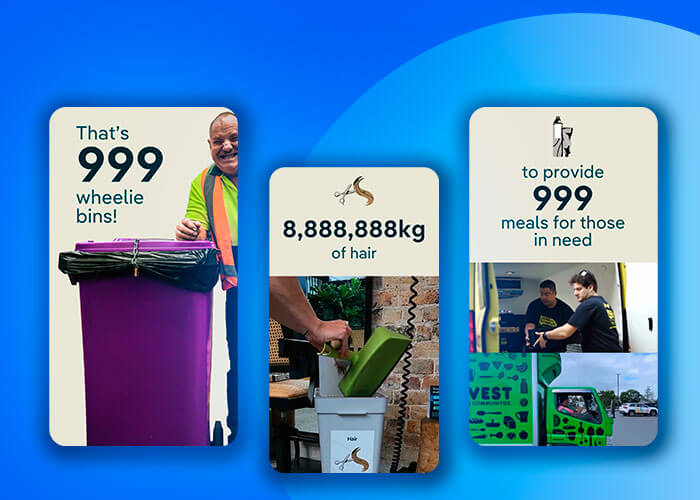
Sustainable Salons is a profit-for-purpose organization in Australia and New Zealand. It helps salons and related businesses reduce waste and create environmental impact.
Its members include hair salons, barbers, pet groomers, beauty businesses, and dermal clinics.
The organization collects materials such as hair, metals, paper, plastics, and chemicals. It wanted members to better understand their individual role in that impact.
The challenge
Sustainable Salons had meaningful member impact data, but the information was dense.
The team needed members to understand the value of their participation, feel proud of their own contribution, and have something they could share with their network.
Static social tiles and impact certificates helped communicate part of the story, but they could not explain several impact data points, connect them to the broader mission, and make each member feel personally recognized.
The same applies to plain PDF reports. A PDF can provide detail, documentation, and proof. But when the goal is recognition, sharing, and emotional engagement, a static report may not be enough on its own.
The approach
The team used a Spotify Wrapped-style approach because it gave them a familiar model for turning individual data into a personal recap.
The goal was not to copy Spotify’s design.
The goal was to help members see their own environmental impact in a format that felt easy to understand and worth sharing.
That distinction matters. A campaign like this should not start with “How do we imitate Spotify?” It should start with “How do we make each person’s data meaningful enough to care about?”
The execution
The campaign used:
- four audience segments
- an average of seven personalization fields per template
- Canva-based creative files
- personalized video templates
- personalized landing pages
- dynamic account names
- a download CTA
- QA before launch
Depending on the segment, the personalized fields included data such as account name, year of membership, kilograms of hair, litres of chemicals, metals, plastics, kilograms of paper, number of trolleys, number of trees, and other impact-related fields.
The Sustainable Salons team created the base videos in Canva. Pirsonal’s Professional Services then helped turn the Canva creative and structured member data into personalized videos and landing pages.
The timeline
The campaign came together in three main stages:
- The Sustainable Salons team created and approved the Canva files in about one week.
- Pirsonal prepared all four personalized video templates in eight business days.
- After the final creative and data handoff, the personalized videos, landing pages, and QA were ready in about 72 hours.
That timeline is important because many teams assume a campaign like this requires a long, complex production cycle.
It does require planning. The message, data, creative, CTA, and QA still matter.
But with the right data, creative, and support, it can move much faster than many teams expect.
The result
Within the first five days, hundreds of members shared their personalized impact videos.
That was the real signal: the campaign gave members a personal story they were proud to share.
The campaign did not work only because the video was personal. It worked because the whole experience helped members see, understand, and share their own impact.
Read the full Sustainable Salons case study.
Why Canva was useful, but not enough by itself
Many marketing teams already use Canva to create videos, social assets, and campaign creative.
That is a good starting point.
But Canva alone does not usually solve the full challenge of creating a personalized video for every customer, member, donor, partner, student, or employee.
A team may be able to create one strong recap video in Canva.
The harder question is:
How do we turn this into hundreds or thousands of personalized videos, each with the right data, landing page, CTA, and tracking?
That is where a personalized video platform like Pirsonal fits.
In the Sustainable Salons campaign, Canva helped the team create the base creative in a tool they already knew.
Pirsonal helped turn that creative and structured member data into personalized videos and personalized landing pages at scale.
This is an important distinction.
The campaign was not “Canva versus Pirsonal.”
It was Canva for creative production, plus Pirsonal for personalization, scale, landing pages, interactive CTAs, QA, analytics, and campaign execution.
This matters for lean marketing teams because they often do not need to replace their creative workflow. They need to make that workflow scalable and personal.
Why the landing page and download CTA mattered
The personalized video was only one part of the experience.
The landing page helped give the video context. It made the campaign feel personal before the video even started. It also created a clear place for the next action: download and share the video.
That matters because many personalized campaigns fail after the video.
The viewer may watch, but then wonder:
- What should I do next?
- Can I share this?
- Can I download it?
- Is this meant for my team, customers, followers, or network?
- Where do I go if I want more information?
A good landing page reduces that confusion.
For Sustainable Salons, the download CTA was central to the campaign:
“Share this impact with your network! Download Now”
This made sharing part of the experience, not an afterthought.
This type of experience can be supported by Pirsonal Player, which helps add personalized CTAs, forms, logic, and viewer-level analytics to videos so each viewer gets a relevant next step based on who they are, what they see, and what they need to do.
The lesson is simple: if sharing, renewal, registration, donation, booking, or participation is the goal, the next step must be built into the experience.
To know more about how to run successful personalized video campaigns like this one, watch this video first:
Static report vs. personalized recap video
A personalized recap video does not always replace a report. In many cases, the best approach is to use both.
| Format | Best for | Limitation |
|---|---|---|
| PDF report | Detail, documentation, proof, compliance, executive review | Often dense, less personal, harder to share emotionally |
| Dashboard | Data exploration, internal reporting, ongoing tracking | Requires effort from the viewer and may not tell a clear story |
| Static social tile | Quick sharing, simple visual summary | Limited space for context and multiple data points |
| Generic video | Brand story, broad message, campaign awareness | Does not show each viewer their own role |
| Personalized recap video | Recognition, understanding, sharing, next action | Requires clean data, personalization setup, QA, and a clear CTA |
| Personalized landing page | Context, delivery, CTA, analytics, branded experience | Needs planning and connection to campaign goals |
A useful way to think about it is this:
The report gives people the detail. The personalized video gives them a reason to care.
How to make a personalized recap campaign shareable
People share personalized recap campaigns when two things are true.
First, the content gives them emotional permission.
Second, the experience gives them practical permission.
Emotional permission
The viewer needs to feel:
“This says something about me that I am proud to share.”
That may be pride in their impact, progress, contribution, status, taste, loyalty, community, or achievement.
Practical permission
The viewer also needs to feel:
“This is easy to share.”
That means the campaign should include a clear download path, social-safe messaging, a simple CTA, and a format that works well on mobile.
Many campaigns focus on the creative but forget the share path.
That is a mistake.
If you want people to share, the campaign needs to be designed for sharing from the beginning.
How to measure success beyond video views
Video views are useful, but they are not the full story.
A personalized recap campaign should be measured across the full behavior path.
Ask:
- Did people receive the message?
- Did they open or click?
- Did they play the video?
- Did they watch enough to understand the story?
- Did they click the CTA?
- Did they download or share?
- Did the campaign create follow-up conversations?
- Did it support renewals, participation, sales, donations, registrations, or another business goal?
For some campaigns, the most valuable outcome may not happen inside the interactive video player.
It may happen afterward.
A member shares the video. A customer forwards it internally. A donor feels more connected to the mission. A field team uses it as a conversation starter. A partner uses it to show progress. A customer success manager uses it to support a renewal.
This is why campaign measurement should include both digital engagement and follow-up business impact.
What teams can use Spotify Wrapped-style campaigns?
A Spotify Wrapped-style personalized video campaign can work for any organization with meaningful individual data and an audience that needs to feel recognized, informed, or guided.
| Audience | Data used | Emotion created | Next action |
|---|---|---|---|
| Members | Contribution, milestones, participation | Pride, belonging | Renew, share, participate |
| Donors | Donation, project impact, community outcomes | Gratitude, trust | Give again, share |
| Customers | Usage, savings, progress, milestones | Value, recognition | Renew, upgrade, book review |
| Students | Progress, applications, next steps | Clarity, motivation | Register, complete, apply |
| Employees | Benefits, training, recognition | Confidence, belonging | Enroll, complete, participate |
| Partners | Performance, growth, opportunities | Confidence, momentum | Book review, sell more |
| Franchisees | Location performance, customer impact | Pride, accountability | Improve, share, renew |
The campaign format is flexible.
The key is not the industry.
The key is whether the audience has a meaningful personal story hidden inside the data.
How this works in B2B, B2C, and B2B2C marketing
A Spotify Wrapped-style campaign can work across B2B, B2C, and B2B2C marketing, but the message and goal change depending on the audience.
B2B
In B2B, a Spotify Wrapped-style video campaign can summarize customer value, product usage, partner performance, account milestones, onboarding progress, or annual ROI.
The goal is usually to support retention, expansion, customer success, or partner enablement.
For example, a SaaS company could show each customer how many workflows they completed, how much time they saved, which teams adopted the product, and what next step would increase value.
A partner program could show each partner their performance, growth, engagement, and next recommended action.
A professional services company could show clients what was delivered, what changed, and where the next opportunity is.
B2C
In B2C, the campaign can show loyalty activity, personal milestones, purchases, savings, usage, achievements, or community participation.
The goal is often engagement, loyalty, repeat purchase, sharing, reactivation, or education.
For example, a fitness, education, retail, travel, or financial services brand could show each customer their progress, milestones, rewards, usage, or next best action.
B2B2C
In B2B2C, the campaign can help an intermediary show end users, members, partners, or local teams the value they are part of.
This is where Sustainable Salons is especially useful: the organization helped members see their own impact so they could share it with their customers and network.
A membership network, franchise system, association, financial advisor group, insurance network, sustainability program, or partner ecosystem could create personalized recap videos for each partner, member, advisor, location, or end customer.
What to prepare before building a Spotify Wrapped-style campaign
Before starting production, gather the key campaign inputs.
You do not need everything to be perfect, but you do need enough clarity to avoid confusion later.
Prepare:
- the campaign goal
- the audience or segments
- the data fields available
- the data owner
- the creative owner
- the approval owner
- the base creative direction
- the desired video format
- the personalized fields
- the landing page copy or structure
- the CTA
- the distribution channel
- the success metrics
- the timeline and approval process
- the QA process
- the fallback plan for missing or invalid data
For most teams, the hardest part is not creating the video.
The hardest part is aligning the message, data, and next step before production begins.
When a Spotify Wrapped-style campaign may not be the right fit
A personalized recap campaign can be powerful, but it is not always the right choice.
It may not be worth it if:
- the audience data is too limited or unreliable
- the message does not need personal context
- there is no clear next step after watching
- the campaign is only being created to copy a trend
- the team cannot review or approve the data before launch
- a simple email, PDF, or static asset would already solve the problem
- the campaign goal is unclear
- the timeline does not allow for proper QA
- the audience may find the personalization intrusive or irrelevant
The best campaigns start with a meaningful message, not a format.
Use a Spotify Wrapped-style approach when personalization helps the viewer understand something important about themselves, their progress, their value, or their contribution.
Common mistakes to avoid
Mistake 1: Personalizing only the name
A name is useful, but it is rarely enough.
The viewer should see information that makes the message feel meaningfully connected to them.
Mistake 2: Turning the video into a data dump
More data does not always make the campaign better.
Choose the data that helps the story land.
Mistake 3: Treating the video as the whole campaign
The video matters, but so do the landing page, CTA, delivery method, sharing path, and follow-up.
Mistake 4: Making sharing too difficult
If you want people to share the recap, make that action obvious and easy.
Mistake 5: Replacing the report instead of supporting it
A personalized video does not need to replace a full report. This is a lesson Lucy confirmed in the case study interview.
The video can create the emotional entry point.
The report can provide the detail and proof.
A useful way to think about it is this:
The report gives people the detail. The personalized video gives them a reason to care.
Mistake 6: Starting with the tool instead of the message
Before choosing software, decide what you want the viewer to understand, feel, and do.
The technology should support the message.
It should not define it.
How Pirsonal helps teams create personalized recap campaigns
Pirsonal helps marketing teams turn customer, member, donor, partner, employee, or student data into real personalized video experiences at scale.
This is different from simply creating one branded recap video.
Pirsonal helps teams create many personalized versions, each connected to the right data, landing page, CTA, and analytics.
Teams can start from creative assets they already have, including Canva, After Effects, Premiere, or other branded video files. Pirsonal can then help turn those assets into dynamic templates, generate personalized videos, create personalized landing pages, add interactive CTAs, and track viewer behavior.
Pirsonal can also support:
- video template creation
- personalized landing pages
- interactive CTAs
- campaign setup
- data-to-video workflows
- analytics
- QA
- strategic guidance before launch
- support with spreadsheet, CRM, API, or integration-based workflows
- campaign review and optimization
For teams planning a year-in-review campaign, impact report, customer recap, member update, or partner review, Pirsonal can also support the strategic and technical work that makes the campaign reliable: template setup, data mapping, QA, campaign setup, analytics, and launch guidance.
This was the value for Sustainable Salons.
Their team had the idea, the data, and the Canva creative. Pirsonal helped turn those pieces into a personalized campaign members could watch, download, and share.ta, and Canva-based creative. Pirsonal helped turn those assets into a scalable personalized video campaign members could watch, download, and share.
Final thought
People do not share reports because they are reports.
They share stories that help them feel seen.
That is the real opportunity behind Spotify Wrapped-style campaigns.
Not copying Spotify.
Not making another flashy recap.
But turning meaningful data into a personal story each customer, member, donor, partner, student, or employee can understand, feel proud of, and share.
If your team is planning a year-in-review, impact report, member update, customer recap, donor report, or annual campaign, the Sustainable Salons case study shows what this can look like in practice.
Or, if you are already planning a campaign like this, talk to a Pirsonal expert today.