
Pirsonal helps teams turn real audience data into on-brand personalized video campaigns people understand, trust, and act on.
or See how Pirsonal compares side-by-side →

- When Pirsonal Is the Better Fit
- Where Pirsonal Fits Among Personalized Video Platforms
- Compare Personalized Video Software by Category
- Side-by-Side Personalized Video Platform Comparisons
- Compare Personalized Video Platforms by Capability
- Compare Support, Security, and Procurement Fit
- Compare Personalized Video Creative Capabilities and Production Workflows
- Real Personalized Video Campaign Examples
- Pirsonal Is Trusted by Mighty Teams Who Want Results—Not Just Software
- Why Teams Use Pirsonal for Real Personalized Video Campaigns
- And Built for How Real Teams Work
- Frequently Asked Questions: Personalized Video Platform Comparison
- Ready to See What Fits Best?
- Turn real customer, member, student, employee, donor, or account data into personalized videos people can understand
- Launch campaigns from 1,000 to 100,000+ personalized videos without forcing every project into a heavy enterprise rollout
- Move from data to campaign launch without stitching together separate tools for video generation, delivery, calls to action, analytics, and support
- Work from a spreadsheet, CRM, API, form, or integration without overcomplicating the process
- Give each viewer a clear next step, not just a video to watch
- Keep the creative on-brand while using the workflow that fits the campaign and team
- Get practical help with templates, data preparation, QA, rendering, delivery, and campaign launch
→ Want to see how this applies to your team? Scroll on.
Strong product—but stronger service. They didn’t just give us a platform. They worked with us every step of the way.
Coleman Rigg, EVP, Client Services, Managing Partner, FVM

These tools are usually used for one-to-one prospecting, sales follow-up, account-based outreach, or quick customer-facing video messages.
These tools are usually used to create AI-generated videos with avatars, synthetic presenters, voiceovers, or text-to-video workflows.
These platforms are usually evaluated for large, complex personalized video programs, advanced enterprise requirements, long-term customer communication workflows, or heavier implementation needs.
These tools are usually used to generate many video variations from templates, spreadsheets, design files, After Effects projects, Canva assets, or existing campaign assets.
Still defining your requirements? Read our guide on how to choose personalized video software before comparing vendors.
Planning your first campaign? Download the personalized video campaign checklist to define your goals, data, workflow, delivery, and vendor requirements before choosing a platform.
How to read this table: “Yes” means the capability is clearly supported or core to the vendor’s public positioning. “Partial” means the vendor supports a related or narrower workflow. “External” means the workflow is usually handled outside the platform. “Validate” means the capability may depend on plan, integration, implementation, output format, security review, or procurement requirements.
| Vendor | Vendor type / workflow orientation | Audience-data personalization | Rendered video output | Native viewing destination | Interactive actions | Campaign analytics / action tracking | Full comparison |
|---|---|---|---|---|---|---|---|
| Pirsonal | Personalized video platform for secure, data-driven campaign execution | Yes | Yes — MP4, WebM, OGG, with resolution and aspect ratio defined by campaign requirements | Yes — personalized pages and interactive player | Yes | Yes | Pirsonal platform overview |
| Idomoo | Enterprise personalized and interactive video platform | Yes | Yes / Validate formats | Yes / Validate viewing and landing-page workflow | Yes | Yes / Validate | Idomoo vs Pirsonal |
| SundaySky | Enterprise video personalization platform | Yes | Yes / Validate formats | Yes — player, embed, portal, landing page, app, email, or social sharing | Yes | Yes | SundaySky vs Pirsonal |
| Plainly | Template-based video automation platform | Yes | Yes — custom output formats and encoding | External / Validate | External / Partial | External / Partial | Plainly vs Pirsonal |
| Canva Bulk Create | Bulk creative and template automation tool | Partial | Partial / Validate | External | External | External | Canva Bulk Create vs Pirsonal |
| Vidyard | Video messaging, hosting, and GTM video platform | Partial | Yes / Validate at campaign scale | Yes — hosted video pages and player | Yes / Validate | Yes | Vidyard vs Pirsonal |
| Sendspark | AI-assisted personalized video messaging platform | Partial | Yes / Validate at campaign scale | Yes — personalized video pages | Yes / Validate | Yes / Validate | Sendspark vs Pirsonal |
| HeyGen | AI avatar and synthetic video generation platform | Partial | Yes | Partial / Validate | Partial / External | Partial / External | HeyGen vs Pirsonal |
How to read this table: “Hybrid” means software plus expert help or managed campaign support. “Enterprise-led” means the buying motion is usually more service-led or implementation-led. “Self-serve” means the customer usually manages most setup and execution. Public security and compliance signals should always be validated during procurement, especially when sensitive customer, employee, student, member, or financial data is involved.
| Vendor | Support model | Public security / compliance signals | Custom security or procurement review | Key details to validate |
|---|---|---|---|---|
| Pirsonal | Hybrid — software plus expert help; managed campaign support available | UNE-EN ISO/IEC 27001; GDPR; DPA, SCCs, data residency options, EU AI Act, and secure campaign workflows | Yes — security questionnaires, legal documents, and campaign-specific requirements | Data residency preference, hosting setup, DPA/SOF requirements, campaign support scope, and delivery workflow |
| Idomoo | Enterprise-led / service-led | ISO 27001 publicly referenced | Validate through enterprise sales, procurement, or security review | Implementation scope, service model, security documentation, data residency, analytics, and pricing structure |
| SundaySky | Enterprise-led / service-led | SSAE SOC II, HIPAA, and GDPR publicly referenced | Validate through enterprise sales, procurement, or security review | Implementation scope, security documentation, viewing workflow, integration requirements, and reporting model |
| Plainly | Self-serve plus technical and project support | ISO 27001 and GDPR publicly referenced | Validate by plan, project, or security requirement | Rendering minutes, support level, implementation help, delivery ownership, analytics ownership, and security documentation |
| Canva Bulk Create | Self-serve; enterprise support depends on Canva plan | ISO 27001, SOC 2, SOC 3, PCI DSS, and Data Privacy Framework publicly referenced | Validate by plan, especially for Canva Enterprise | Bulk Create limits, video export workflow, data handling, admin controls, approval workflow, and campaign delivery needs |
| Vidyard | Self-serve, team, and enterprise support | GDPR, Microsoft SSPA, and SOC 2 Type 2 publicly referenced | Validate by plan or enterprise review | Note: Personalized video is a legacy product of Vidyard, no longer available to new customers |
| Sendspark | Self-serve / sales-led support | GDPR and SOC 2 Type 2 publicly referenced | Validate by plan or security review | Batch scale, automation workflow, CRM integration, campaign analytics, compliance documentation, and data handling |
| HeyGen | Self-serve, team, enterprise, and API support | SOC 2 Type II, GDPR, CCPA, EU-US Data Privacy Framework, and EU AI Act publicly referenced | Validate by plan, API use case, or enterprise review | AI content governance, model training policy, data residency, enterprise controls, output rights, and security documentation |
Vendor support models, certifications, compliance claims, and procurement processes can change. Use this table as a starting point and validate details during your demo, procurement process, security review, and campaign planning.
How to read this table: “Personalizable content” describes what can change inside the video. “Creative system” describes the software or production model used to create and personalize the video. “Production workflow” explains whether the team works through a flexible input-based workflow, a proprietary platform, After Effects, Canva, video messaging, or AI avatar generation.
| Vendor | Personalizable content inside the video | Charts, graphs, or data visuals | Creative system & Production workflow | After Effects required? | AI / avatar-first? | Best creative fit | Full comparison |
|---|---|---|---|---|---|---|---|
| Pirsonal | Images/graphics, video/footage, music/narration, and text | Yes / as campaign visuals or data-driven assets | Pirsonal Engine, Editor, Script; flexible input-based workflow using assets from After Effects, Canva, Premiere Pro, DaVinci Resolve, existing edits, images, audio, text, or other campaign assets. | No | No | Teams that need practical, on-brand personalized video campaigns using real brand assets, without adding more creative production complexity than the campaign requires. | Pirsonal platform overview |
| Idomoo | Images/graphics, video/footage, music/narration, and text | Yes | Idomoo platform / layered video engine | Yes | No / optional AI capabilities | Teams that want a platform-led workflow for highly produced personalized and interactive video programs. | Idomoo vs Pirsonal |
| SundaySky | Images/graphics, video/footage, music/narration, and text | Yes | SundaySky video personalization platform | Yes | No / optional AI capabilities | Teams that want a platform-led workflow for highly produced personalized video experiences. | SundaySky vs Pirsonal |
| Plainly | Images/graphics, video/footage, music/narration, and text | Yes / through After Effects workflow | Plainly plus After Effects | Yes | No | Creative, production, or technical teams that already use After Effects and want deep AE-based automation control. | Plainly vs Pirsonal |
| Canva Bulk Create | Images/graphics, text, and basic media or design variables | Limited / design-based | Canva Bulk Create | No | No | Teams creating lightweight bulk design or creative variations from Canva templates. | Canva Bulk Create vs Pirsonal |
| Vidyard | Recorded videos, hosted videos, overlays, CTAs, and sales context | Limited / external | Vidyard video messaging and hosting platform | No | Partial | Revenue teams creating sales videos, hosted video pages, and buyer engagement workflows. | Vidyard vs Pirsonal |
| Sendspark | Recorded or AI-assisted video messages | Limited / external | Sendspark video messaging and outreach platform | No | Partial | Sales, marketing, and GTM teams creating personalized video messages for outreach. | Sendspark vs Pirsonal |
| HeyGen | Avatars, voice, | Limited / external | HeyGen AI video generation platform | No | Yes | Teams creating AI presenters, avatar-led videos, translated videos, or synthetic video content. | HeyGen vs Pirsonal |
Creative workflows and production capabilities can vary by plan, implementation, and project requirements. Use this table as a starting point and validate the exact creative workflow, file formats, template requirements, production responsibilities, and rendering process during your vendor evaluation.



- Customer onboarding
- Lifecycle messages
- Product updates
- Internal or partner comms
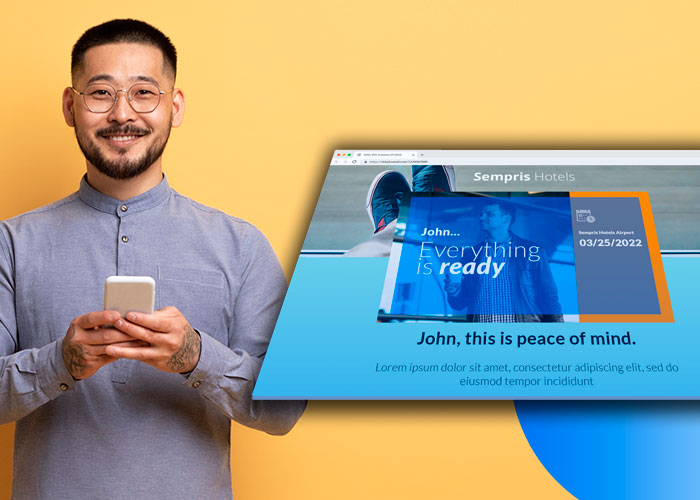
Whether it’s your first campaign or your fiftieth, Pirsonal adapts—without forcing extra work.
- We help plan your first rollout
- We build or QA your first templates
- We support your team or run the whole thing if needed
This isn’t “just software.” It’s execution that doesn’t slow you down.

- ISO 27001 certified infrastructure
- EU & US data residency
- Private cloud video rendering
- Anonymized URLs & deletion APIs
- SLA-backed support on higher plans
We help you get IT, legal, and compliance sign-off—fast.

- Launch CRM-triggered or spreadsheet-based campaigns—no dev needed
- Add interactive CTAs, buttons, and forms to drive conversions
- Use your own brand’s tone, visuals, and layout—beyond template limits
- Move fast with onboarding support and built-in integrations
We launched a fully personalized video campaign without waiting on devs or redesigning our assets. It looked like it came from us—because it did.

- Trigger personalized onboarding videos from product usage or CRM events
- Explain plans, benefits, or next steps automatically
- Use CTAs for activation, surveys, or education
- Combine videos with dynamic landing pages
We identified users who hadn’t tried a key feature, then used personalized videos to guide them—and activated about 5% who would’ve been overlooked otherwise.

- Trigger video generation using JSON-RPC API, cronjobs, or form submissions
- Control layouts, scenes, and content dynamically using JSON or templates
- Integrate with your backend, Zapier, or custom workflows
- Launch fast—and scale later—on ISO 27001 infrastructure with EU/US residency
I needed something I could prototype quickly and scale later without rebuilding it. Pirsonal’s API was easy to integrate, and their support made sure I didn’t miss anything critical.

- Manage multiple client projects with flexible templates and workflows
- Use client assets—or let our team build templates for you
- Stay on-brand with fonts, layouts, and interactive features
- Offer scalable video personalization with margin-friendly pricing
We work with enterprise clients, so the quality, branding, and data have to be flawless. Pirsonal made it easy to deliver personalized videos that met every spec—and gave us the support to avoid any missteps.

Frequently Asked Questions: Personalized Video Platform Comparison
- The key differences between platforms
- What fits your volume, goals, and timeline
- Real examples of personalized video campaigns
See real examples and how this would work for your campaign.